
A jail for your AI coding agent
Your agent runs with your user account, so it can read everything you can. ai-jail starts it inside an OS sandbox instead: the project is writable, and your keys, tokens and home directory are not there.
cd ~/Projects/my-appai-jail claude
Your agent runs as you
A coding agent is a program under your user account. It, and every script, package and MCP server it starts, can open anything you can open.
Start it through ai-jail
Type
ai-jailin front of the command. The agent starts in its own namespaces, with your project mounted at the same path.Your home is not mounted
The agent gets a fresh, empty home directory. SSH keys, cloud credentials, browser profiles and your other projects do not exist in there.
Secrets, network and devices are off
Environment variables are cut down to an allowlist, so tokens in your shell stay in your shell. The network, the Docker socket, the screen and the clipboard are all off.
Open what the task needs
A cloud agent needs the network and its own login, so you turn those two on. Everything else stays shut until you ask for it.
The wall goes around the whole harness
Agents that ship a sandbox put it around the commands the model runs. The agent process, its file tools, its MCP servers and its hooks stay outside, under your account. ai-jail starts all of them inside.
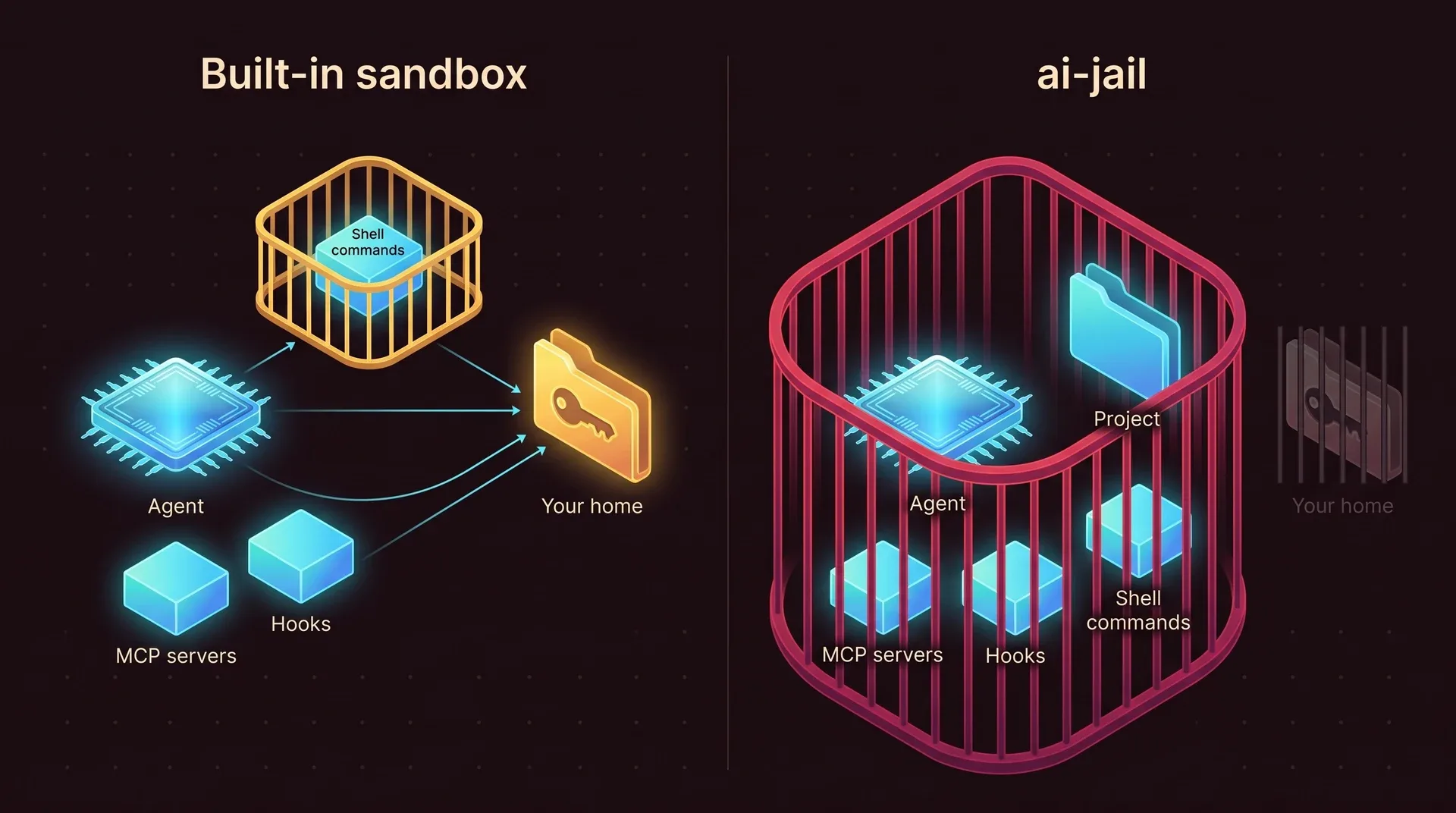
What you get with no configuration
Every capability is off until you turn it on. Writes outside the project land in memory and vanish when the session ends.
Inside the jail
- Your project directory, read and write, at its real path
- System toolchains in
/usr, read only - A fresh home directory and a private
/tmp
Out of reach
~/.ssh,~/.aws,~/.gnupg, browser profiles- Tokens and API keys in your shell environment
- Other processes, host IPC, kernel interfaces such as
ptraceandbpf
Off until you ask
--network--agent-state, the agent's own login--ssh,--gpu,--display,--dockerand more
Several kernel layers, one small binary
On Linux, bubblewrap builds the namespaces and mounts, Landlock repeats the filesystem rules inside the kernel, seccomp blocks dangerous system calls and resource limits stop runaway processes. On macOS the same policy becomes a sandbox-exec profile.
No daemon, no root
ai-jail is a single Rust binary that starts your agent and exits with it. Nothing keeps running in the background, and you never type sudo.
Your toolchains, not an image
The agent uses the compilers and runtimes already on your machine. There is no container image to build or keep up to date.
A repository cannot loosen it
A .ai-jail file inside a project can tighten the sandbox and never open it. Only your own global file and your flags can.
Questions people ask first
Does it slow the agent down?
Which agents does it support?
ai-jail bash gives you a shell inside the jail to look around.Does it work on Windows?
My agent needs the internet. Is the jail still useful?
--network on, the agent can still only read your project, so your keys and the rest of your home are not there to send. What it can read, it can send, which is why masking secrets inside the project matters. See how to mask them.Is it free?
Put your agent behind bars
ai-jail is a single binary that needs no daemon and no root. You add one word in front of the command you already run.
brew tap akitaonrails/tap && brew install ai-jailai-jail claude